Chrome may be the default browser on Android, but more people are trying this instead
Technology · July 15, 2026

iOS 27 will be worth upgrading for users who want a much smarter Siri, AI-powered photo tools, stronger security and faster everyday performance. iPhone 15 Pro and newer owners will benefit most from Apple Intelligence features. The biggest caveats are EU launch restrictions for Siri AI and limited advanced AI capabilities on older iPhones.
Apple has revealed what’s coming in its annual iPhone software update later in 2026, but should you actually install iOS 27 when it arrives?
While iOS 26 introduced headline features such as the Liquid Glass redesign, Call Screening and Apple Intelligence tools, iOS 27 focuses on refining the experience with a smarter Siri, faster performance, stronger security and more powerful AI features.
So, how does iOS 27 compare with iOS 26, what’s genuinely new, which iPhones get the biggest upgrades, and is it worth updating from your current version of iOS? Here’s everything you need to know.
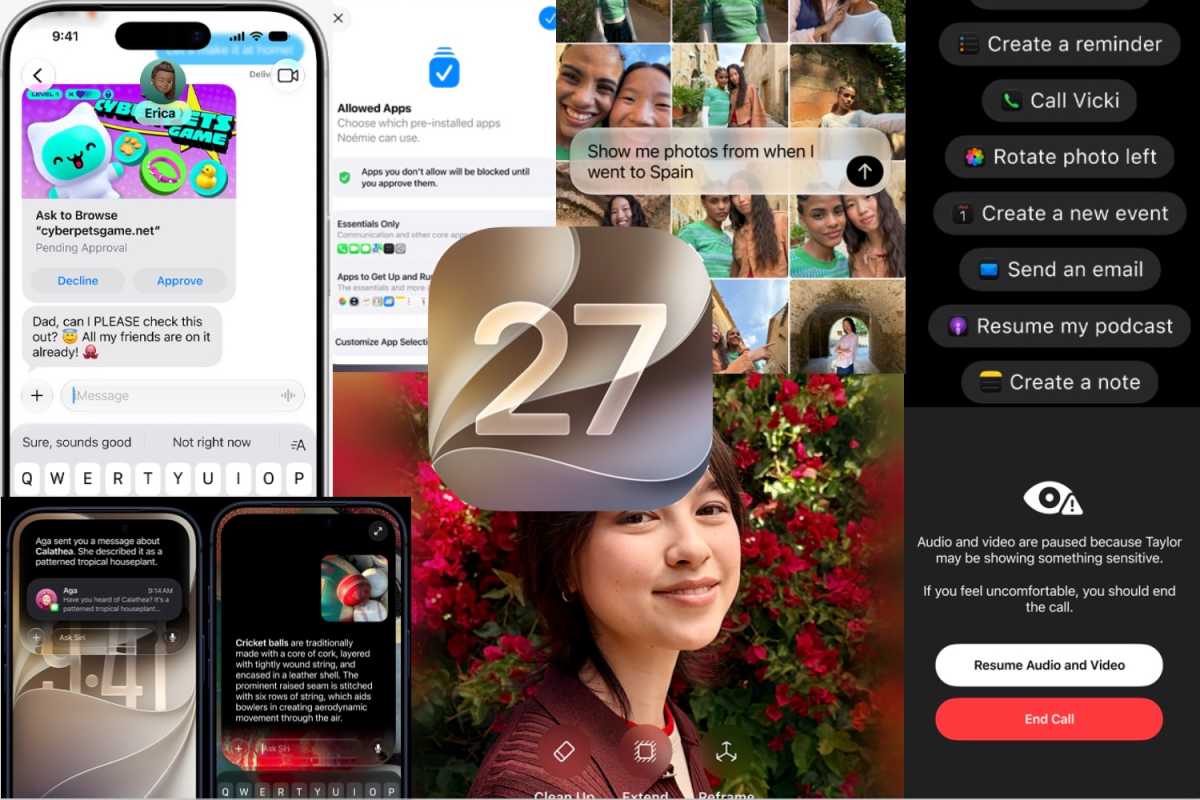
iOS 27 may seem a little light on specific new features, with more focus seemingly given to performance, security and sorting out Siri. Here’s the main improvements Apple announced:
Yes: iOS 26 introduced Apple Intelligence features; iOS 27 transforms Siri into a contextual AI assistant with cross-app actions.
Yes: iOS 26 focused on features and redesigns; iOS 27 prioritises speed, responsiveness, stability and system optimisation.
iOS 26 added Visual Intelligence screenshot analysis; iOS 27 adds generative editing, expansion and reframing tools.
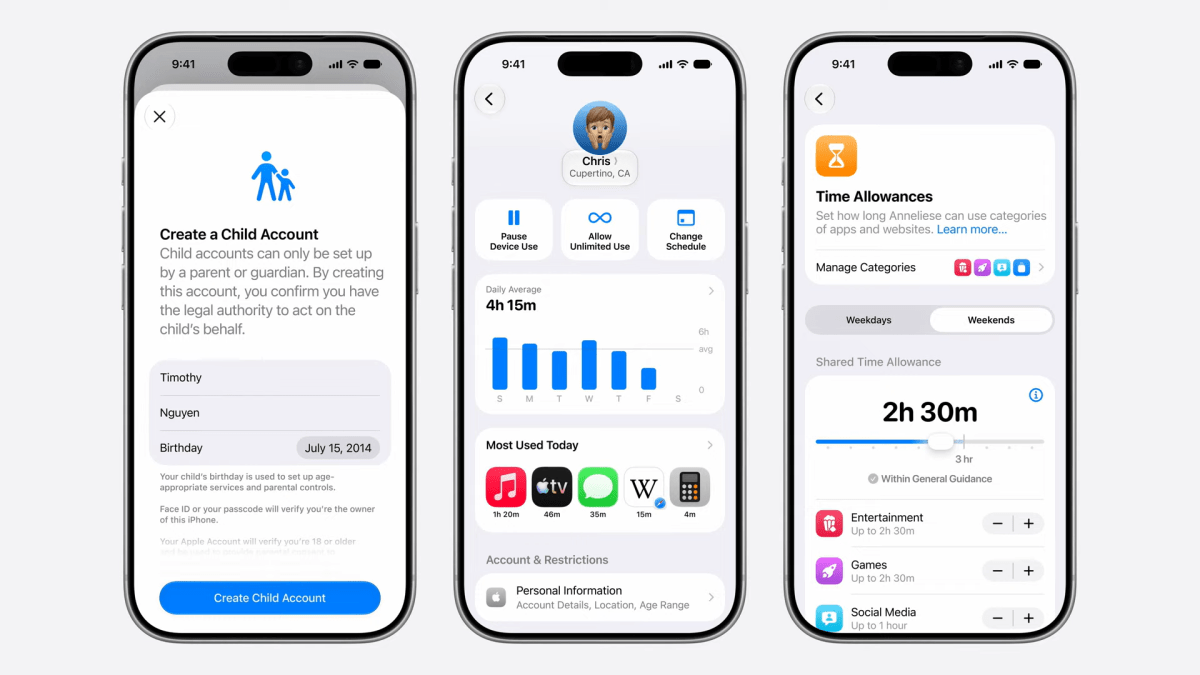
iOS 26 introduced improved child protections; iOS 27 adds website approvals, category controls and enhanced monitoring.
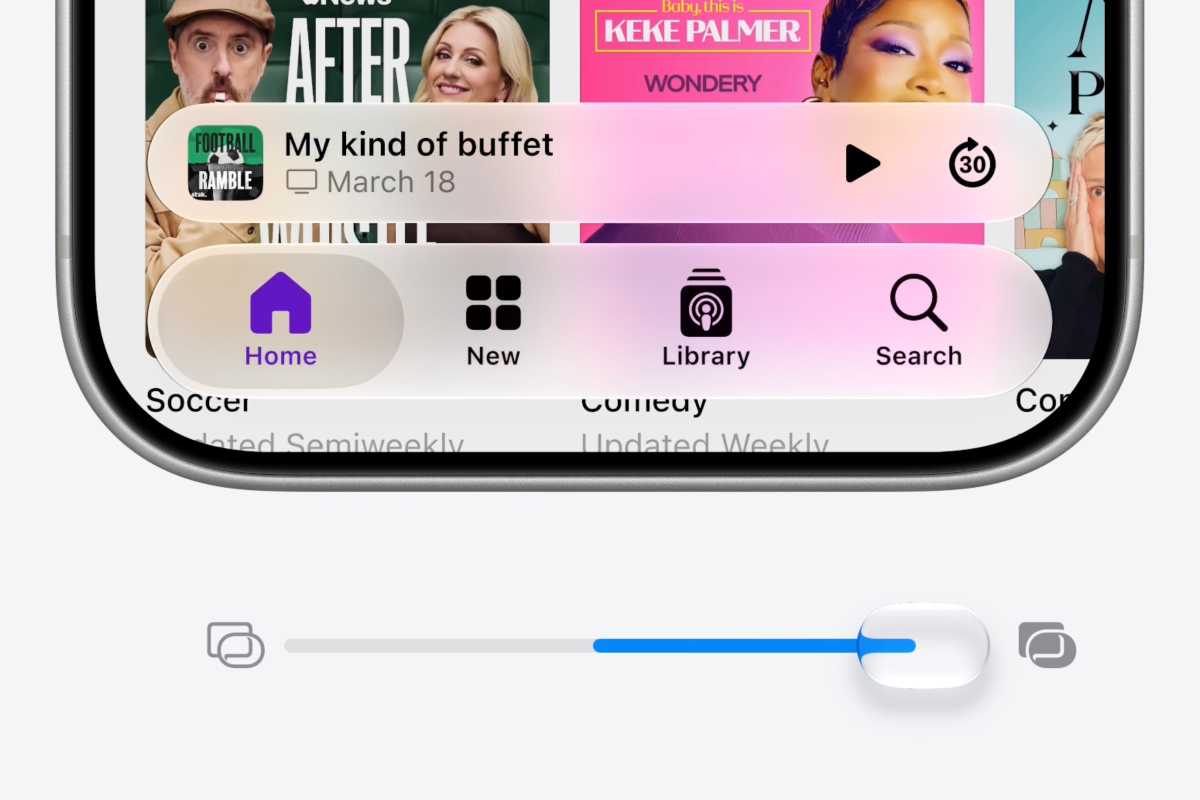
iOS 26 introduced Liquid Glass; iOS 27 refines it with better readability, clarity and adjustable intensity controls.
| Category | iOS 27 | iOS 26 |
|---|---|---|
| Siri | Full Siri AI with personal context, cross-app actions and conversational workflows | Basic Apple Intelligence integration, Live Translation, Visual Intelligence |
| Performance | Up to 30% faster app launches, 70% faster photo loading, 80% faster AirDrop | Standard optimisation |
| Design | Refined Liquid Glass with improved readability and adjustable transparency | Introduced Liquid Glass interface |
| Photos | AI image expansion, object removal, Reframe and enhanced Image Playground | Visual Intelligence screenshot analysis |
| Phone | Call Context surfaces relevant emails, messages and information during calls | Call Screening, Hold Assist, voicemail summaries |
| Security | Automatic password replacement for compromised accounts | Password management improvements |
| Parental Controls | Ask to Browse, category-based limits and expanded safety protections | Ask to Buy and Communication Safety |
| Games | Largely unchanged | New dedicated Games app |
| AI Features | Next-generation Apple Intelligence powered by Siri AI and Gemini integration | First wave of Apple Intelligence features |
| Focus | AI, performance, security and reliability | New features and redesign |
New features coming in iOS 27
Foundry
Apple traditionally makes it new version of iOS available when it launches the new iPhones. With the iPhone 18 lineup set to arrive in September, you can expect iOS 27 to make it’s debut then.
When iOS 27 arrives later this year, you’ll be able to run it on the following devices;
One thing to note is that the most advanced on-device AI models will be restricted to only the iPhone Air and iPhone 17 Pro. This seems to be linked to the amount of RAM available, and you’ll only miss out on some of the new Siri voice models and dictation accuracy.
Apple
When iOS 26 launched in September 2025, it introduced major changes including the Liquid Glass redesign, a revamped Phone app, and new Apple Intelligence features such as Call Screening, Live Translation, voicemail summaries and Hold Assist. Apple also added a dedicated Games app, redesigned the Camera app and expanded Visual Intelligence with screenshot analysis and ChatGPT integration. Read our comprehensive iOS 26 guide for more information.
By comparison, iOS 27 focuses less on introducing entirely new features and more on improving Siri, boosting performance, enhancing security and expanding AI capabilities. Here are the biggest changes coming later this year.
A large chunk of Apple’s keynote was taken up with the new, improved version of Siri. Powered by the next generation of its Apple Intelligence models (which now combines with Google’s Gemini technology) Siri AI will bring some advanced features to the platform when it arrives later this year.
The new models use two main information pools – Personal Context understanding (all the data stored on your iPhone) and Broad world knowledge (all it can draw from the web) – combining to provide a complete picture of what you’re looking for or want to do.
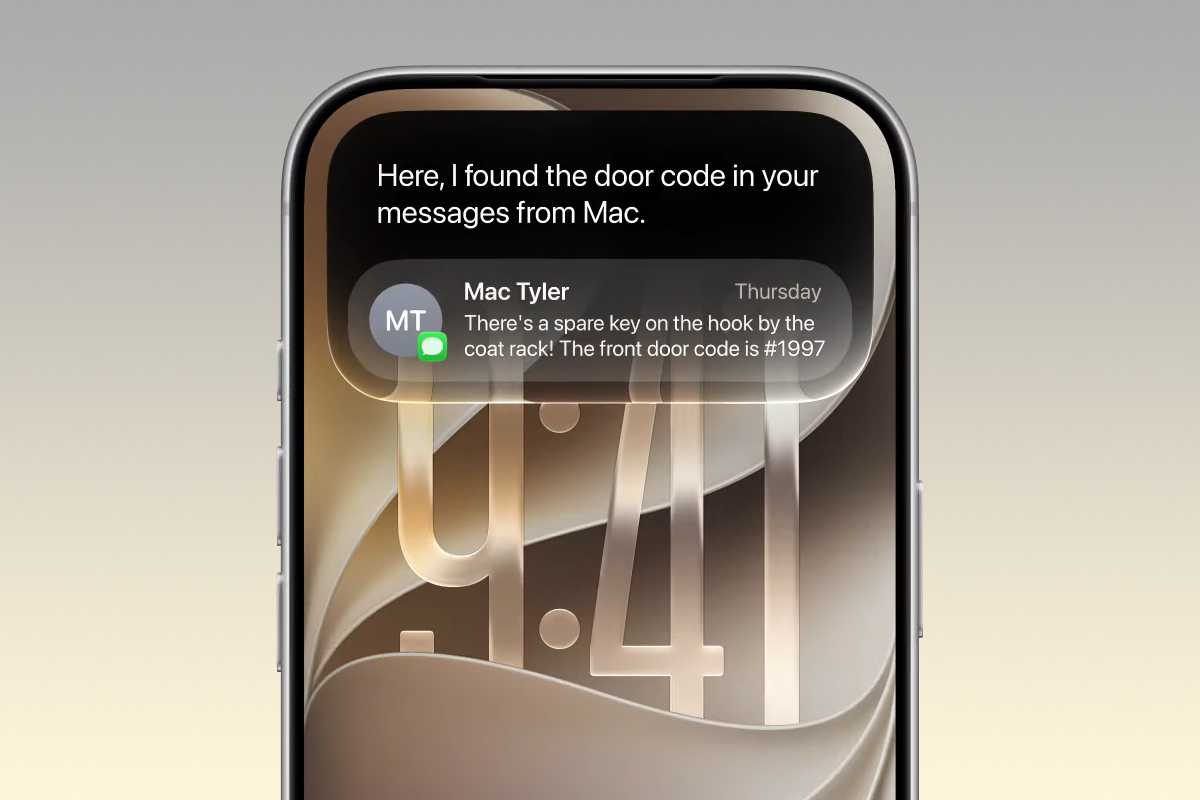
Thanks to deep integration into the OS itself, and in particular Apple apps like Mail, Messages and Photos, Siri AI will be able not only to answer questions in a conversational manner, but it can also monitor communications you have and then offer context-based actions.

Apple
Say you exchange a few emails with a friend about a potential meet-up. Siri AI can surmise from the text what’s going on, then offer to create a Calendar entry for the relevant time and date, all without you needing to ask for anything.
It should also be able to find photos or things mentioned in messages just by you asking it to track them down. For example, if someone sent you a message about a new TV show they thought you would like, but you can’t remember what it was, you can simply ask Siri AI ‘Hey, what TV show did Paul say I should watch?’, which will trigger a search through your conversations to find the answer.
In the demonstration, Apple also showed how the new Siri AI functionality works across multiple Apple applications. For instance, in one section we saw Siri AI being asked when a certain performer’s concert was coming up. Then, it was asked how to buy tickets, with the answer showing that there was a lottery draw. The demonstrator then told Siri AI to set a reminder for when the lottery would begin, while also playing a song from the artist in Apple Music. This was all seamlessly in the conversation, rather than a separate set of tasks.
In another example, Siri AI was asked where a contact’s new address was? This was found in a Message, then it was instructed to plot the journey there in Apple Maps, which it did without issue.
Apple
Other features include Call Context, where Siri will automatically bring any relevant information to your attention when you’re on a call with someone. So, if you call a builder you’ve arranged some work with, Siri will show you the emails exchanges and any other data it thinks you might need for the conversation.
There seems to be plenty of scope for the new Siri AI, and it will accessible either by the normal voice command, swiping down from the Dynamic Island or holding the Side Button for longer interactions. You’ll also be able to see all your previous interactions and conversations in the new dedicated Siri app, which syncs across all your Apple devices.
Ok, we’ve been burned in the past with Apple’s AI promises, but the focus on this year seems to be more on making the basics work well and that could be what most people actually want. One caveat is that due to an ongoing disagreement with the EU, countries in the Union won’t be able to get Siri AI on iPhone or iPad at launch.
While this falls into the standard remit of Siri AI, it does feel like it needs it’s own section, as Apple announced that the new powers gifted to its digital assistant would enable it to do something very useful. Provided you keep your login details to all your accounts and sites in the Apple Passwords app, you can instruct Siri to find any compromised passwords, log in to the revenant service and change them automatically to a new, safer one. These would then be stored in the Passwords app and your details would be secure once more.
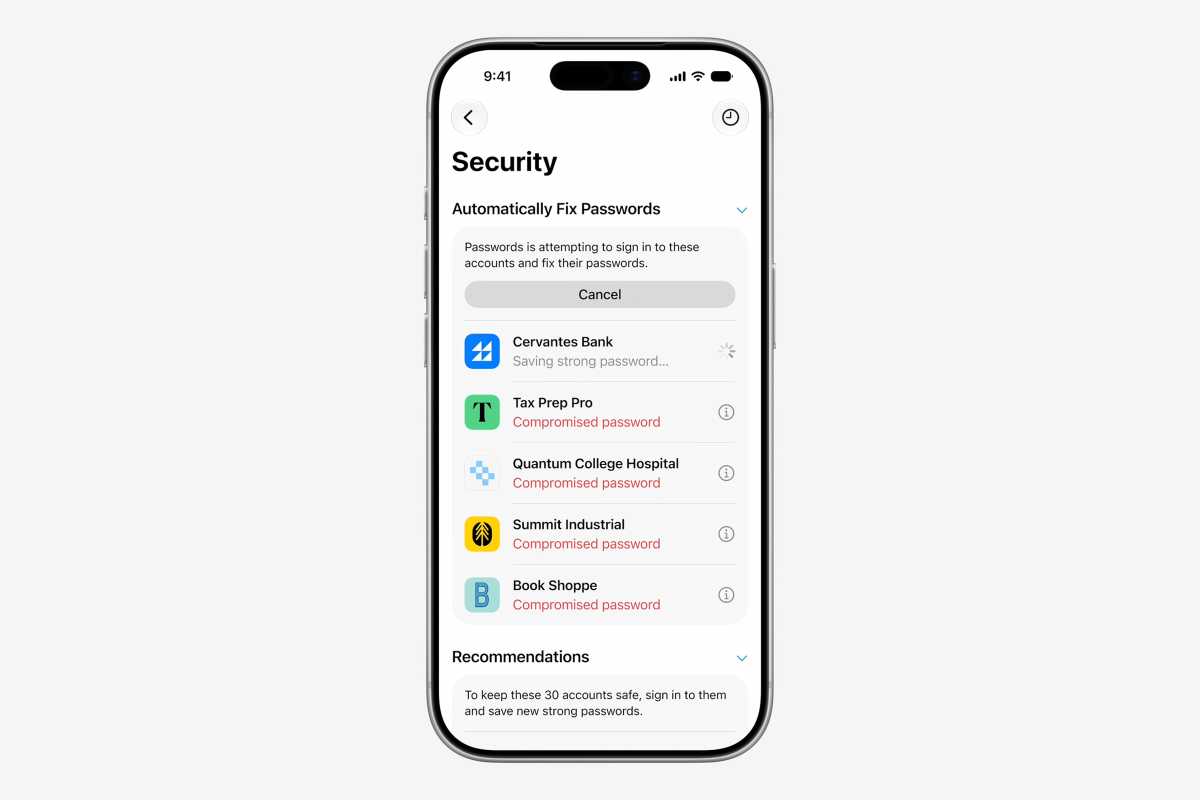
Siri will look after changing your password.
Apple
If this works then it could be a game changer, as the painful truth is that most of us ignore this important job as it would just take too long.
Apple showed off some pretty impressive photo features powered by the new AI models in iOS 27. When the update arrives you’ll be able to take existing images and have Siri increase the area of the image by up to 25%, with the new surrounding parts auto-generated by the system to match the rest of the image. It’s like zooming out and finding that there’s more to the image than you first thought.
You can also clean up parts of images with more powerful tools that can remove large objects while still persevering the look of the photo. Perhaps the most stunning though is Reframe, which lets you take an existing image and change it’s perspective, with the new areas filled in by AI generated content. Essentially, you can pan around the subject and Siri will magically make it look real.
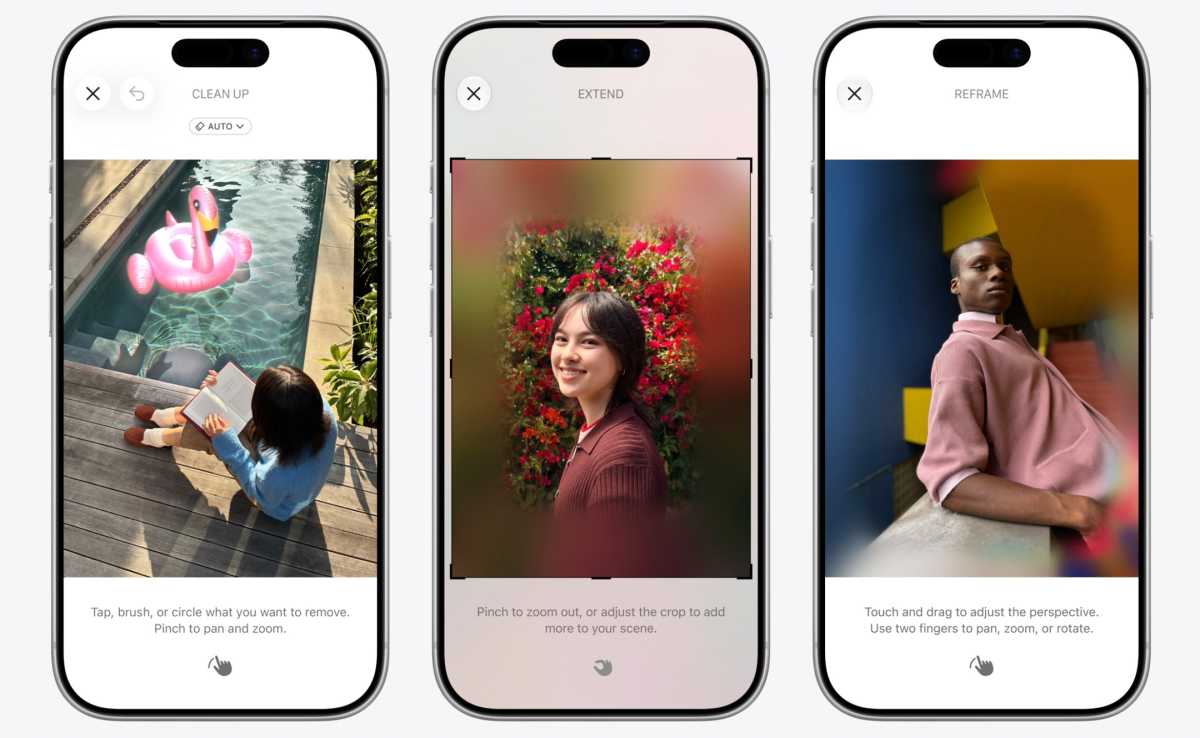
Use AI to make your photos even better.
Apple
Image Playground has also been revamped so you can create images from prompts as well as change photos into a variety of styles just by asking Siri AI.
Apple takes privacy and safety seriously, and that extends to younger users. With iOS 27 you’ll now have expanded control over Screen Time for your kids, with the three main areas of Entertainment, Games, and Social Media all having granular times limits and schedules that you can set to prevent little ones from spending too much time on their devices.
Dedicated Child Accounts come with guidance on the kind of usage is heathy for children, with Apple working alongside the American Academy of Pediatrics to give parents and idea of what is appropriate for their kids. The controls also change as the child gets older, allowing my precise controls rather than blanket settings.
Apple
Alongside the Ask to Buy feature already present in iOS 26, where children can send a message to their parent asking permission to make app purchases, iOS 27 adds Ask to Browse, which prevents the child from opening a website they haven’t used before until they get permission.
Communication Safety will now also monitor any messages coming in or out of the child’s device, preventing any sexual or violent images from being able to be seen, received or sent.
One of the biggest changes in iOS 26 was the introduction of the Liquid Glass graphical interface. This wasn’t entirely met with cheers and adoration, so Apple has done some work and brings needed fixes in iOS 27. These include subtle redesigns, such as frosted menu bars across the top of sections of the interface where there are controls. This should help with legibility, as will some of the other colour and clarity adjustments that Apple announced. There will also be a slider in the Settings that allows you to manually change the level of the effect on the interface.
Apple
Performance is set to get an upgrade too, with Apple promising plenty of enhancements to the underlying engine. It claims that iPhone apps will launch 30% faster, new photos load into libraries up to 70% quicker, and AirDrop gets the biggest boost as transfer times could be reduced by up to 80%.
Apple went hard on AI back when the iPhone 16 launched, and it wasn’t exactly the success everyone expected, with features delayed and the roll-out proving frustrating for some.
You’d think that Apple wouldn’t let lighting strike twice, so we’re looking forward to seeing if the promise of Apple Intelligence really does come to fruition with iOS 27. If you want AI then we’d say that this could be a huge upgrade when it arrives in September. For a more detailed look at what’s coming, take a look at our comprehensive iOS 27 guide.
If you want to get your hands on the new features ahead of time, you can always sign up to be an Apple Beta Tester for iPhone, although we’d strongly advise against doing this if you only have one iPhone, as the software is still in development and could have some big bugs lurking inside.
If you can wait, then September isn’t far away, and when it comes around there should be some very shiny new toys to play with.