We asked which Googlebook you’d buy and many said they’d pass
Technology · October 30, 2026

Editor’s note: On Friday afternoon, Meta announced that the feature to generate images in Meta AI by @mentioning public Instagram accounts is no longer available. Meta released the following statement:
Earlier this week, we announced that one way for people to generate images in Meta AI is by @-mentioning public Instagram accounts that they want to reference. Our intent was to provide a useful creative tool and to give people control over whether their public content could be referenced in this way. We’ve heard the feedback that this feature missed the mark, so it’s no longer available.
Meta press release
Instagram recently unveiled 30 new AI effects, based on the new Muse Image developed by Instagram’s parent company, Meta. Instagram also launched a feature allowing users to tag their friends using their @usernames and generate AI-generated images from their content.
While the new features are presented innocuously, a support article from Instagram’s Help Center clarifies who can use your images for AI generation:
If you have a public account, other Instagram users may be able to create new reels, posts or stories that reuse part or all of your published photos, videos or reels in features like remix, sequence, templates and stickers. In addition, people may be able to create content with your Instagram content using AI features at Meta.
In other words, anyone with an Instagram account–individuals, groups, companies, etc.–can use your posted content and “create content…using AI features.” All those iPhone photos you take and share with friends and followers are fair game. What’s worse, tthis is an opt-out feature. By default, Meta is allowing all public posts to be used with Muse.
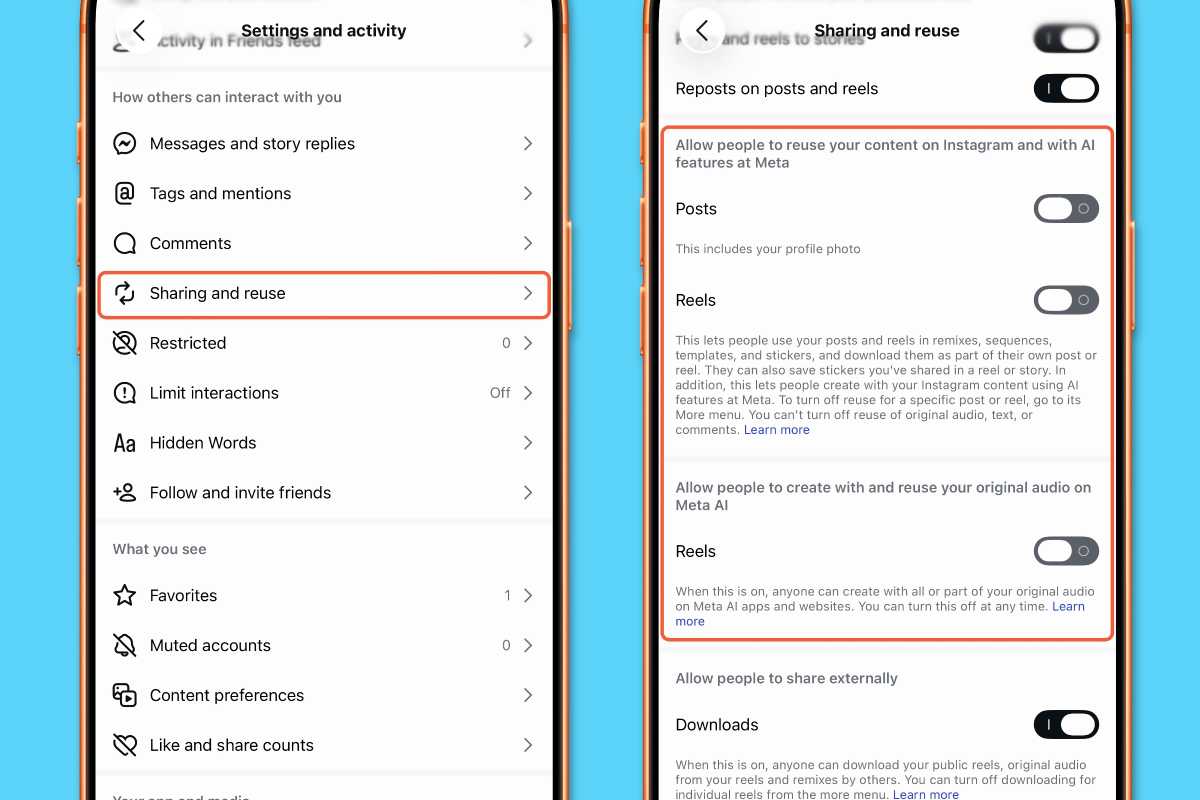
If you prefer to not allow others to take your Instagram content and use AI to modify it for their own purposes, you can do something about it. Instagram allows you to opt out through the Instagram privacy settings. Here’s how to adjust the settings. You must use the Instagram app on the iPhone. You cannot modify the settings on the web.
Foundry
There are several other settings in this section you should review. Some you may feel comfortable leaving on; others you may want to switch off. For example, at the very bottom of the screen, there is a setting to Allow businesses to interact with you.
In Meta’s press release, the new Muse Image is presented as a celebration of human creativity. Furthermore, Meta describes only one scenario, in which friends tag you and then reuse the content with Meta AI. The support document offers a different, significantly broader interpretation of content reuse: Anyone on Instagram can use your photos and Reels to make AI without needing to tag or credit your account on Instagram.
The Share and Reuse option has existed on Instagram for several years. Meta is exploiting an existing function and users’ consent to implement a new feature. It will be interesting to see how the courts in Europe and the U.S. interpret Meta’s creative take on its users’ consent forms.